
I have problem with IDM integration in PaleMoon browser version 26 or above. What should I do?
1. You have PaleMoon version from 26 up to 27.7
There are major changes in PaleMoon version 26. Our extension for FireFox uses Gecko-Sdk. PaleMoon since version 26 till 27.7 does not support it anymore. The only way to integrate IDM into such versions of this browser is IDM inbuild advanced integration.
To do this, open "Options→General" IDM dialog and provide path for palemoon.exe file using "Add browser..." button (arrow 2 on the image).
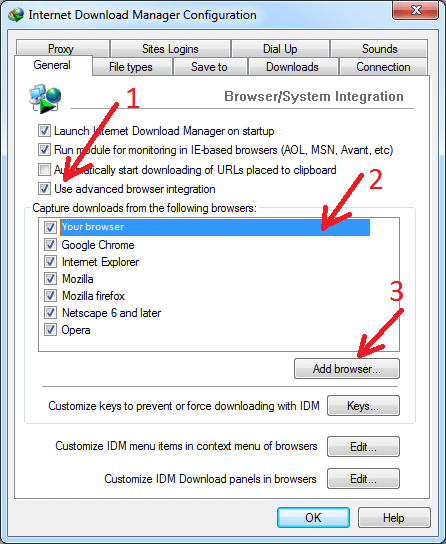
With such integration (without extension) IDM video download panel will appear in bottom left corner of a web page. But please note that with such integration IDM does not detect HTTPS requests - there will be no detection of downloads and video download panel. On some sites you can change protocol in address bar of your browser - change HTTPS:// to HTTP:// and video requests will also use HTTP protocol.
2. You have PaleMoon version 28 or above
Please make sure that you have installed the latest version of IDM (6.33 Build 3 or above).
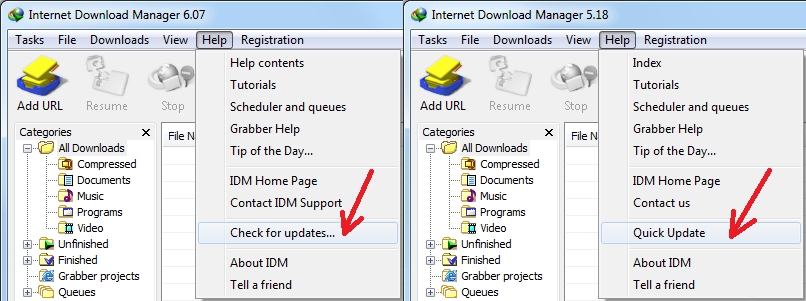
Then please restart your computer. IDM needs to replace all its DLL files for changes to take effect. Without restarting update will not work!
Then please install this extension: