
IDM integration into my browser does not work. What should I do?
Download panel for video is not shown or shown in some wrong place. What should I do?
My browser is not listed in "Options→General" IDM dialog. How can I integrate IDM into it?
Please make sure that you have installed the latest version of IDM.
Please click on your browser below:


1. If you browser is not Internet Explorer, FireFox or Chromium based the only way to integrate IDM into your browser is IDM inbuild advanced integration. Open "Options->General" IDM dialog and check that integration into your browser is enabled (arrow 1 on the image).
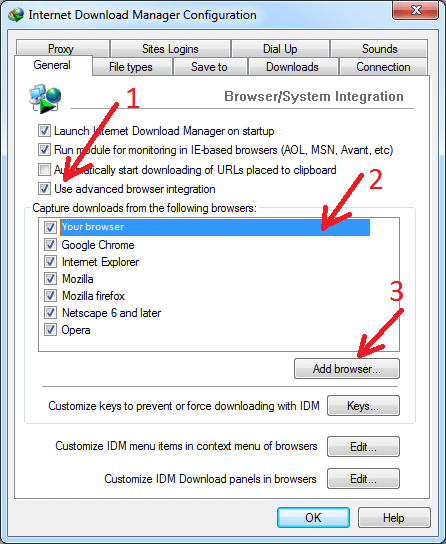
2. Please note that integration may not work when browser is launched in Admin mode. This can happen not only if you do this intentionally but when you launch your browser from some intermediary program like Total Commander that is launched in Admin mode or if you use some portable version with a custom launcher.
3. If your browser is not in the list, you have to press "Add browser..." button (arrow 2 on the image). Then locate your browser executable file. IDM will add it to the list and start getting downloads from it.